
Internet Marketing and AI blog
Facebook's New Privacy Settings Are Misleading
With all the changes going on with Facebook right now one might get lost in some of the finer points, like ... oh ... that their Privacy page is incredibly misleading and that your posts aren't going out the way you may mean for them to. Ordinarily I prescribe to the user being responsible for understanding how social media is distributed but this latest change is either purposely misleading (most likely) or at the very least, just plain stupid (and since Mark & Co over at Facebook are fairly bright ... I'll assume that isn't it).
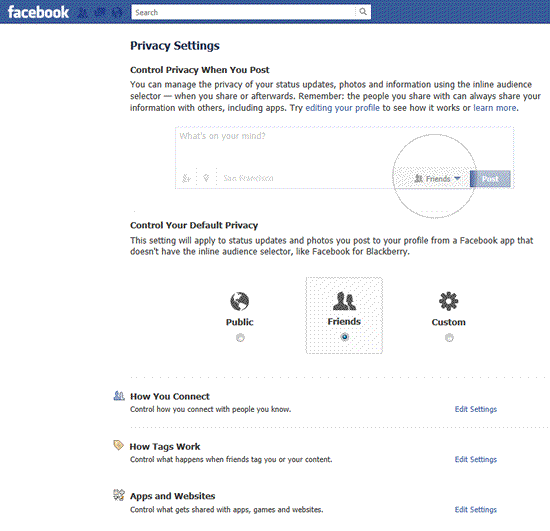
So what's the issue? Let's take a look at how the information is being presented. here's their current privacy setting page (fo those of you who don't know how to access it, click the arrow to the top right of the Facebook page and select "Privacy Settings"). You'll see ...
Notice that the Default Privacy is set for "Friends". Not, what happens when I go to submit a post? I get the following ...
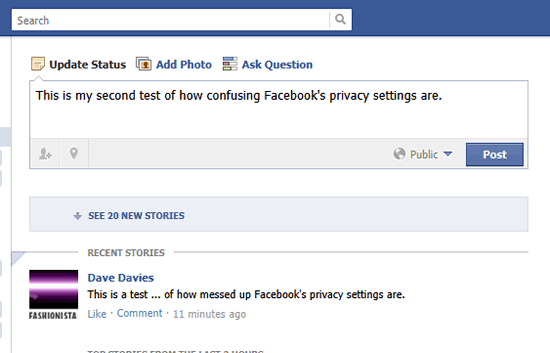 Notice that right below the status update and to the left of the "Post" button is who is should be visible to and that by default it's set to "Public" in a nice light color. If you read the "Privacy Settings" page carefully you'll notice that it reads, "This setting will apply to status updates and photos you post to your profile from a Facebook app that doesn't have the inline audience selector, like Facebook for Blackberry." and doesn't apply to your PC-based activities but the way they've done it keeps the user looking to the big buttons with the defaults.
To be sure, they have noted it but user and eyetracker testing will tell you, we're all a bit lazy and when we read "Default" with big easy buttons to click - we're going to do that. If they had labeled it "Mobile and App Default Settings" then there would be less confusion and we'd all be more clear on what we're selecting the defaults for.
Notice that right below the status update and to the left of the "Post" button is who is should be visible to and that by default it's set to "Public" in a nice light color. If you read the "Privacy Settings" page carefully you'll notice that it reads, "This setting will apply to status updates and photos you post to your profile from a Facebook app that doesn't have the inline audience selector, like Facebook for Blackberry." and doesn't apply to your PC-based activities but the way they've done it keeps the user looking to the big buttons with the defaults.
To be sure, they have noted it but user and eyetracker testing will tell you, we're all a bit lazy and when we read "Default" with big easy buttons to click - we're going to do that. If they had labeled it "Mobile and App Default Settings" then there would be less confusion and we'd all be more clear on what we're selecting the defaults for.
Notice that the Default Privacy is set for "Friends". Not, what happens when I go to submit a post? I get the following ...
Notice that right below the status update and to the left of the "Post" button is who is should be visible to and that by default it's set to "Public" in a nice light color. If you read the "Privacy Settings" page carefully you'll notice that it reads, "This setting will apply to status updates and photos you post to your profile from a Facebook app that doesn't have the inline audience selector, like Facebook for Blackberry." and doesn't apply to your PC-based activities but the way they've done it keeps the user looking to the big buttons with the defaults.
To be sure, they have noted it but user and eyetracker testing will tell you, we're all a bit lazy and when we read "Default" with big easy buttons to click - we're going to do that. If they had labeled it "Mobile and App Default Settings" then there would be less confusion and we'd all be more clear on what we're selecting the defaults for.